KISS Method: Keep it.. super simple
Feeling overwhelmed by a growing to-do list? Do tasks & projects often slip through the cracks? Whether at work or in personal life, it happens to all of us. Luckily, there’s a simple, visual method that can help you get organized and boost your productivity: the Kanban board. While popular in software development, you don’t need to be technical or have any complicated software to use it.
What is Kanban?
Kanban, a Japanese word meaning “visual signal,” is a method that started in factories to help them make things more efficiently. Think of it as a visual workflow system. In its simplest form, a Kanban board is a visual representation of your work, divided into different stages. This allows you to see at a glance what needs to be done, what’s in progress, and what’s been completed.

Why Use a Kanban Board?
- Simplicity: Kanban is incredibly easy to understand and use. No complicated software or technical expertise is required. You can get started with just a whiteboard and some sticky notes.
- Flexibility: It can be adapted to any type of work, from personal tasks and errands to complex projects at work.
- Visual Clarity: Seeing your work laid out visually helps you prioritize tasks and identify any bottlenecks slowing you down.
- Improved Collaboration: Kanban boards make it easier for teams to work together and stay on the same page.
Setting Up Your Kanban Board
You can create a Kanban board using a whiteboard, sticky notes, and markers, or with online tools like Trello, Asana, Wrike, or even a simple spreadsheet. Here’s how to set up a basic board:
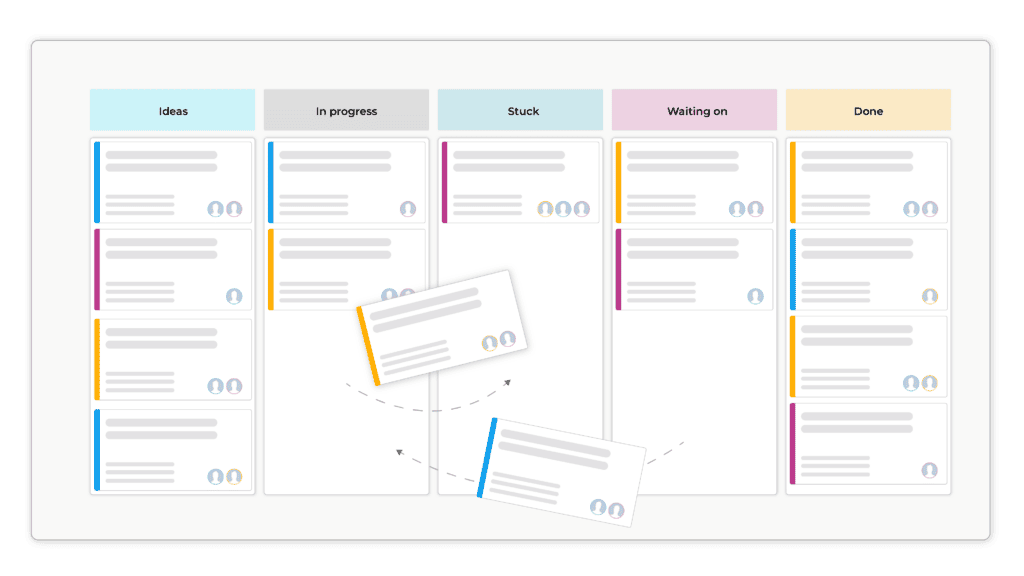
- Create Columns: Divide your board into columns representing the stages of your workflow. A basic setup might include:
- To Do: For tasks that are waiting to be started.
- In Progress: For tasks currently being worked on.
- Done: For completed tasks.
- Add Tasks: Write each task on a sticky note (or create a digital card) and place it in the “To Do” column.
Using Your Kanban Board
- Move Tasks: As you begin working on a task, move its corresponding card from the “To Do” column to the “In Progress” column. Once completed, move it to the “Done” column. It’s really satisfying to move those cards to “Done”.
- Limit Work in Progress: To avoid feeling overwhelmed, limit the number of tasks in the “In Progress” column. This encourages focus and helps you complete tasks more efficiently.
- Prioritize: Visually prioritize tasks by placing the most important ones at the top of each column. You can also use color-coding or labels to further categorize tasks.
- Continuous Improvement: Regularly review your board to identify bottlenecks or areas where your workflow can be improved. Are tasks getting stuck in a certain column? This lets you view everything with three steps back rather than being stuck in the weeds.
Tips for Effective Kanban Use
- Start simple: Begin with a basic board and gradually add complexity as needed. Complicating it early on will only make habit forming more difficult.
- Make it visual: Use colors, labels, and images to make your board more engaging and informative.
- Keep it up to date: Regularly update your board to reflect the current status of your work. An outdated board isn’t very helpful.
- Collaborate: Encourage team members to participate in using and maintaining the board.
- Reflect and adapt: Periodically review your Kanban process and make adjustments to optimize its effectiveness. What’s working well? What could be improved?
Kanban is a powerful tool for managing your work, whether you’re a seasoned professional or just trying to get a handle on your personal to-do list. I used to use Kanban for software development projects, but now I find it just as helpful for managing tasks at home and in my everyday life. It’s a great way to track everything that needs to get done and make sure nothing falls through the cracks. More on Kanban at Wrike.
.M
 Asterops
Leave a comment